


Victorian Coloring Book
4.7135.00 Reviews
App Specs
- Version
- 1.0.7
- Updated On
- License
- Free
- Downloads
- 100,000+
- Developer
- Art Coloring Group
- Categories
- Board
- Platform
- Android
Screenshots







 Analysis by AppCompare
When a tablet or phone sits in a shared room, a simple game can become an easy way for different people to take turns without needing a long explanation. Polygon Color is a board-style coloring game built around filling numbered shapes, so I can see it working well for a quiet pause at home: one person chooses a picture, colors a few sections, then passes the device along. It is a modest kind of shared activity, not a competitive game, and that is part of its appeal.
That setup also comes with a practical question: whose progress and choices are on the device? I would treat it as a game for one person at a time, rather than assume it has separate household profiles or a way to coordinate turns. If several people use the same phone, agreeing on one picture and taking turns is the simplest approach. For a child using a parent’s device, I’d also set expectations about in-app purchases before handing it over, since the game is free to install but offers paid items.
A small shared activity, not a family-management tool
Polygon coloring suits brief, low-pressure turns better than a family session that depends on everyone making decisions together. The numbered regions give each player an obvious next step, so a younger user can contribute without needing to invent a design from scratch. An adult can take over later and continue the same picture if the group wants to finish it together, though the experience remains individual coloring rather than a dedicated co-op mode.
For example, I can imagine opening it while waiting for dinner, choosing a picture, and letting each person fill a handful of sections before passing the phone. That works best when the group is happy with a calm activity and does not mind sharing one screen. If people want to draw at once, compare scores, or compete over turns, a multiplayer board game is a better fit.
Decide the boundaries before handing over the phone
On a shared device, I would keep the first session simple: open the game together, look at the available pictures, choose one, and agree that the next player continues rather than starting over. This avoids the small but familiar friction of someone changing a picture when another person expected to finish it. It is also a sensible moment for the device owner to review purchase settings and decide whether children may make purchases.
The game’s free entry makes trying it straightforward, but “free” does not mean every available item is included. In-app purchases range from $0.99 to $59.99 per item, so the upper end is worth noticing before a child uses the device unsupervised. I would not rely on the game itself to enforce household spending rules; those are better handled through the device’s own purchase controls and an adult’s guidance.
Age, trust, and what to expect
The age rating is Everyone, which makes the basic coloring concept broadly approachable. The numbered-coloring format also gives children a clear structure, while adults may enjoy it as a low-effort way to occupy a short break. Still, an age rating is not a substitute for a parent’s judgment about screen time, spending, or whether a particular child is ready to use a shared device independently.
Worth Reading Before You Choose

EA SPORTS FC Mobile 26 Is a Bigger Football Game, but It Takes Time

Flipboard Shows What News Apps Must Do Beyond the Feed

Switching to Android Auto Means Rethinking Your Driving Routine

Google Calendar Makes a Crowded Week Easier to Manage

Ludo King Makes the Most of the Minutes Between Plans

Baby Panda World Brings Quick Play to Modern Phones, but Its Game Library Feels Busy
Art Coloring Group is the developer, and the game has an average rating of 4.8 from 249 ratings, with 10K+ installs. Those figures suggest that it has found an audience, but I would weigh them alongside the household’s needs: a calm solo activity is a different promise from a game designed for shared progress or active play. The current version is 1.0.4, and the minimum operating-system requirement is 7.1.
Where it fits among coloring and board-game choices
Compared with a physical coloring book, this game is easier to carry and does not need pencils or a clean table. Compared with free-form drawing apps, the numbered regions remove the blank-page problem and make it easier to stop and resume. The trade-off is that the structure leaves less room for spontaneous sketching: if someone wants to choose every color and make marks anywhere, a drawing app or paper and crayons will feel more open.
It is also quieter and less social than the usual turn-based board game. There are no shared strategic choices in the coloring itself, so I would pick it for winding down, filling a waiting period, or giving one person a screen activity while others are nearby—not as the main event for a group looking to talk and compete.
Getting Started with Polygon Color
First things first, you can grab Polygon Color from both Android and iOS app stores. Once downloaded, the installation is a breeze, and you're immediately greeted with a vibrant, user-friendly interface. The app is designed to be intuitive, so even if you're not the most tech-savvy person, you’ll have no trouble finding your way around.
The main screen showcases a variety of images ready for your artistic touch. These images are divided into categories such as animals, nature, and abstract. Each category offers a different level of complexity, so whether you’ve got five minutes or an entire afternoon, there’s something for you.
The Coloring Experience
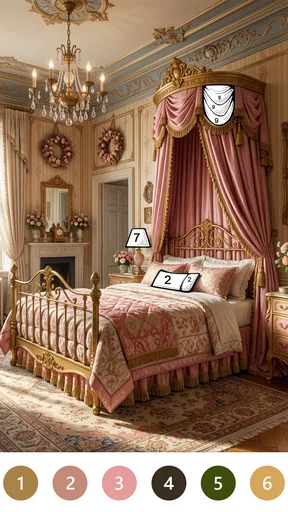
The magic begins once you select an image. The image is divided into different polygons, each marked with a number corresponding to a color in your palette. Think of it as paint-by-numbers, but with a modern twist. The app provides a relaxing, meditative experience, allowing you to unwind and focus on the simple joy of coloring.
One of the standout features is the color palette itself. It’s extensive and beautifully curated, offering a wide range of hues. The app allows you to experiment with different shades, giving you the freedom to make each picture truly your own.
Why You'll Love It
What sets Polygon Color apart is the sheer variety of images and the regular updates. New designs are added frequently, ensuring you never run out of new material. The app's developers have a knack for creativity, and it shows in every update.
But it’s not just about coloring. The app offers a sense of achievement. Each completed image can be saved to your gallery, shared with friends, or even printed. It’s a small but satisfying way to show off your artistic flair.
Room for Improvement?
Of course, no app is perfect. While Polygon Color excels in many areas, it does have a few drawbacks. Some users might find the occasional ad popping up a bit distracting. However, a premium version is available, which eliminates ads and provides additional features for those who want an uninterrupted experience.
Another point to consider is the app's battery usage. Because of its vibrant graphics and interactive features, it can be a bit of a drain on your phone's battery. It’s something to keep in mind if you plan to use it for extended periods.
The Verdict
All in all, Polygon Color is a delightful app that brings a splash of creativity to your daily routine. Whether you’re a seasoned artist or just someone looking for a fun way to pass the time, this app has something to offer. Its simplicity, combined with its extensive library of images, makes it a must-try for anyone with a smartphone.
So, next time you find yourself with a few minutes to spare, why not give Polygon Color a whirl? You might just rediscover the joy of coloring and find a new favorite app in the process.
Choosing it for the right kind of break
The best reason to try this game is not that it turns a phone into a full art studio; it gives a small task a clear shape. When I have only a few minutes, a numbered picture can be easier to start than an open-ended drawing canvas. I can focus on locating matching sections and completing a small part, then decide whether I want to continue. That makes it especially suitable for people who enjoy visual puzzles but do not want a timer, a score chase, or a complicated set of rules.
The same structure is also its main creative limit. Matching regions to colors guides the result, so the satisfaction comes from gradually revealing the image rather than designing one from scratch. If you prefer making your own compositions, editing photographs, or controlling every mark, choose a drawing or image-editing app instead. If what you want is a quiet, guided coloring session, the polygon format offers a more approachable starting point.
A practical way to make short sessions feel smoother
I would choose a picture based on the time and attention available, rather than begin with the most intricate-looking option when I only have a moment. A useful routine is to pick one image, work through a few matching regions, and leave it there when attention runs out. That keeps the activity relaxing instead of turning completion into a chore. For a longer break, settling on one design first can also prevent the session from becoming a string of indecisive browsing.
On a phone, small numbered areas may take more careful tapping than larger regions, so a larger screen can be more comfortable for anyone who finds fine visual details fiddly. I would also keep the device charged if I planned a long coloring session: the game’s graphics and interaction can use noticeable battery power. Those are ordinary usability trade-offs, but they matter more when the game is being used to fill a commute, a waiting period, or a quiet evening.
What the price and release details mean in practice
The game is free to download, which makes it easy to test whether numbered polygon art suits you before spending anything. Paid in-app items are available, with individual prices ranging from $0.99 to $59.99. I would treat purchases as optional extras and make sure the person using a shared device understands that some items may cost money. The listed release date is Apr 19, 2026, and the game is currently at version 1.0.4, so anyone installing it should check that their device meets the stated minimum operating-system requirement.
There is a difference between being able to try a game and knowing whether it will become a regular habit. I’d give it a short test during a real downtime moment rather than judge it only by browsing the picture selection. Does filling the shapes feel calming, or does matching numbers start to feel repetitive? That answer is personal, and it is more useful than assuming a high rating guarantees a fit for every player.
Who is likely to enjoy it—and who may want something else
I would recommend it to someone who likes color-by-number activities, wants a low-pressure way to occupy short breaks, or appreciates having a clear visual task instead of a blank canvas. It can also work as a gentle shared-device activity when people are content to take turns and let one picture develop gradually. Its Everyone age rating makes the basic premise broadly accessible, though adults should still decide how purchases and screen time are handled at home.
I would skip it if you need a genuinely collaborative game, a deep strategy challenge, or a free-form art tool. It is not the best choice for a group that wants constant interaction, nor for someone who dislikes repetitive tapping or wants to create a completely original image. In those cases, a conventional board game, multiplayer game, or drawing app will better match the reason you picked up the device in the first place.
A sensible household verdict
For a home with one shared phone or tablet, Polygon Color is best treated as an optional quiet activity, not a shared account system or a guaranteed way to keep everyone entertained. Agreeing on turns, choosing a picture together, and setting purchase boundaries outside the game can prevent most avoidable misunderstandings. I would keep the expectations modest: it offers a guided coloring pastime, and that can be enough when the household wants something calm and easy to pick up.
Overall, I see it as a worthwhile try for people who enjoy completing images one section at a time. Its accessible format and simple goal make it a reasonable companion for pauses in the day, while the structured coloring and in-app purchases are worth considering before installing it on a child’s or shared device. If that balance suits your household, it may earn a place in your rotation; if you want open-ended creativity or lively group play, another kind of game will serve you better.
Pros
- Intuitive interface for easy navigation.
- Wide variety of colors and shapes available.
- Low learning curve for beginners.
- Offline mode for uninterrupted use.
- Regular updates with new features.
Cons
- Limited free features without subscription.
- Occasional lag on older devices.
- Ads can be intrusive at times.
- Requires internet for some features.
- No support for custom shapes.
FAQs for Victorian Coloring Book
What is Polygon Color and how does it work?
Polygon Color is a creative app designed to provide users with a unique coloring experience using geometric shapes. Users can choose from a variety of polygon-based templates and color them using a wide palette of colors. The app is intuitive and user-friendly, making it perfect for both casual users and those looking to enhance their artistic skills.
Is Polygon Color suitable for children?
Yes, Polygon Color is suitable for children. The app's simple interface and engaging templates make it an excellent tool for kids to explore their creativity. Parental controls ensure a safe environment, and the app promotes cognitive skills such as color recognition and pattern creation, making it educationally beneficial as well.
Does Polygon Color offer any in-app purchases?
Polygon Color offers a free version with basic features and a selection of templates. For those seeking an enhanced experience, the app provides in-app purchases. These include additional color palettes, exclusive templates, and an ad-free experience, allowing users to enjoy the app's full potential without interruptions.
Can Polygon Color be used offline?
Yes, Polygon Color can be used offline. Once downloaded, users can access all their templates and color palettes without needing an internet connection. This feature makes it convenient for users to enjoy the app on the go, whether on a flight or in areas with limited connectivity.
Is Polygon Color available on both Android and iOS?
Polygon Color is available on both Android and iOS platforms. This cross-platform availability ensures that users can enjoy the app's features regardless of their device type. Regular updates are provided for both versions, ensuring compatibility with the latest operating systems and a smooth user experience.


